Java for JavaScript Developers: Fundamentals and Spring Boot (2025 Guide)
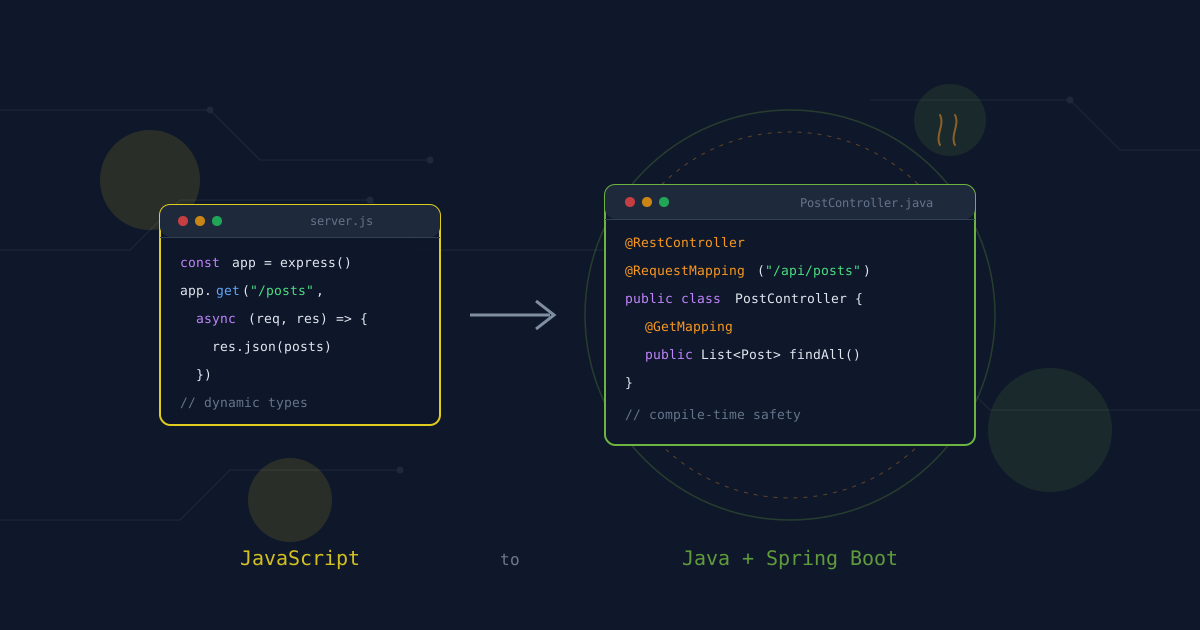
JavaScript and Java share more than just a name—they're both incredibly popular, but they come from different worlds. JavaScript evolved from browser scripting to a full-stack powerhouse, while Java built its reputation on enterprise-grade backend systems. If you're a JavaScript developer looking to expand into Java backend development, this guide will help you map your existing knowledge to Java's ecosystem.
This guide maps familiar JavaScript concepts to Java patterns and introduces Spring Boot for building robust backend applications. The comparisons are learning aids, not exact equivalences—runtime environments, type systems, and paradigms differ significantly.
Version and scope: The examples use Java 21 LTS and Spring Boot 3.x. Java 21 includes modern features like records, pattern matching, and virtual threads. Spring Boot 3.x requires Java 17+ and includes enhanced support for native compilation with GraalVM.
🎯 Who This Guide Is For
- Developers fluent in JavaScript/TypeScript (ES6+, modern patterns)
- Frontend developers expanding to backend development
- Teams adopting Java/Spring Boot for enterprise projects
- Anyone wanting a side-by-side comparison to speed up onboarding
🧩 Core Philosophy Differences
Understanding the philosophical differences is crucial for making the mental shift:
| Aspect | JavaScript | Java |
|---|---|---|
| Nature | Dynamic, interpreted language | Statically typed, compiled language |
| Runtime | Browser, Node.js, Deno | JVM (Java Virtual Machine) |
| Type System | Dynamic (optional TypeScript) | Static, strong typing |
| Paradigm | Multi-paradigm (functional, OO, prototype-based) | Object-oriented with functional features |
| Concurrency | Event loop, async/await | Threads, virtual threads, reactive |
| Module System | CommonJS, ES Modules | Java Platform Module System (JPMS) |
| Package Management | npm, yarn, pnpm | Maven, Gradle |
| Ecosystem | npm registry (millions of packages) | Maven Central (curated, enterprise-focused) |
| Compilation | JIT (just-in-time) in browser/runtime | AOT (ahead-of-time) to bytecode |
| Performance | Optimized for I/O-bound operations | Optimized for CPU-bound operations |
The Mental Model Shift
JavaScript's Philosophy: "Flexibility and speed of development"
- Dynamic typing allows rapid prototyping
- Async/await for non-blocking I/O
- Functional programming patterns
- Massive npm ecosystem
- "Anything goes" approach
Java's Philosophy: "Structure, type safety, and scalability"
- Static typing catches errors at compile time
- Strong typing prevents entire classes of bugs
- Enterprise-grade tooling and conventions
- Mature, stable ecosystem
- "Convention over configuration" (especially with Spring Boot)
Why This Matters:
- JavaScript: Faster initial development, more runtime errors
- Java: Slower initial development, fewer runtime errors
- JavaScript: Great for startups, rapid iteration
- Java: Great for enterprise, long-term maintainability
💡 Key Mental Shift: Java trades development speed for runtime safety and maintainability. Where JavaScript catches errors at runtime, Java catches them at compile time. This feels restrictive at first, but it prevents entire categories of bugs that plague large JavaScript applications.
🚀 Project Setup & Architecture
Creating a New Project
JavaScript (Node.js):
# Initialize a new project
npm init -y

# Install dependencies
npm install express

# Or use a framework
npx create-next-app my-app
npm create vite@latest my-app -- --template react
Java (Spring Boot):
# Using Spring Initializr (web)
# Visit https://start.spring.io/

# Or using Spring Boot CLI
spring init --dependencies=web,data-jpa,h2 my-app

# Or using Maven/Gradle manually
mvn archetype:generate -DgroupId=com.example -DartifactId=my-app

# Run the application
cd my-app
./mvnw spring-boot:run  # Maven
./gradlew bootRun      # Gradle
What Spring Boot Gives You Out of the Box:
- Embedded Tomcat server (no deployment needed)
- Auto-configuration of common dependencies
- Production-ready metrics, health checks, and externalized configuration
- Built-in dependency injection
- Comprehensive testing support
- Easy integration with databases, messaging, caching
Project Structure Comparison
JavaScript (typical Node.js structure):
my-app/
  src/
    controllers/
      userController.js
    services/
      userService.js
    models/
      User.js
    routes/
      userRoutes.js
    middleware/
      auth.js
    utils/
      helpers.js
    app.js
    index.js
  package.json
  node_modules/
Java (Spring Boot structure):
my-app/
  src/
    main/
      java/
        com/
          example/
            myapp/
              MyApplication.java        # Main entry point
              controller/
                UserController.java
              service/
                UserService.java
              repository/
                UserRepository.java
              model/
                User.java
              config/
                SecurityConfig.java
              exception/
                GlobalExceptionHandler.java
      resources/
        application.properties          # Configuration
        application-dev.properties
        static/                         # Static assets
        templates/                      # Server-side templates
    test/
      java/
        com/
          example/
            myapp/
              UserControllerTest.java
  pom.xml                              # Maven build file
  build.gradle                         # Gradle build file
Understanding the Structure:
- Package Structure: Java uses reverse domain naming (
com.example.myapp) - Layered Architecture: Controller → Service → Repository pattern
- Configuration: Properties files for environment-specific settings
- Testing: Separate test directory mirroring main structure
Why the Strict Structure?
- Convention over configuration
- Easy navigation in large codebases
- Clear separation of concerns
- Built-in support for dependency injection
💡 JavaScript Dev Tip: The package structure might feel verbose, but it scales incredibly well. In a 100+ class enterprise application, finding "all controllers" or "all services" becomes trivial.
🔄 Type System: Dynamic vs Static
JavaScript's Dynamic Typing
JavaScript:
// Types can change at runtime
let variable = "hello";
variable = 42;        // No error
variable = { x: 1 };  // Still no error

// Function parameters aren't typed
function greet(name) {
  return `Hello, ${name}`;
}

greet("World");  // Works
greet(42);       // Still works (but might not be what you want)
TypeScript (Optional Static Typing):
// Types are enforced at compile time
let variable: string = "hello";
variable = 42;        // Compile error!

// Typed function parameters
function greet(name: string): string {
  return `Hello, ${name}`;
}

greet("World");  // Works
greet(42);       // Compile error!
Java's Static Typing
Java:
// Types are enforced at compile time
String variable = "hello";
variable = 42;        // Compile error!

// Typed method parameters
public String greet(String name) {
  return "Hello, " + name;
}

greet("World");  // Works
greet(42);       // Compile error!
Type System Comparison
| Feature | JavaScript | TypeScript | Java |
|---|---|---|---|
| Type Checking | Runtime | Compile-time | Compile-time |
| Type Inference | Limited | Strong | Strong |
| Null Safety | No | Optional (strict mode) | Built-in (Optional) |
| Generics | No | Yes | Yes |
| Union Types | No | Yes | No (use interfaces) |
| Type Erasure | N/A | No | Yes |
Modern Java Type Features
Records (Java 14+) - Like TypeScript interfaces:
// Immutable data class
public record User(String name, int age) {
  // Automatically generated: constructor, getters, equals, hashCode, toString
}

// Usage
User user = new User("Alice", 30);
System.out.println(user.name());  // Accessor method
System.out.println(user.age());
Pattern Matching (Java 21) - Like TypeScript type guards:
// instanceof with pattern matching
if (obj instanceof String s) {
  // s is automatically cast to String
  System.out.println(s.toUpperCase());
}

// Switch expressions with patterns
String result = switch (obj) {
  case String s -> "String: " + s;
  case Integer i -> "Integer: " + i;
  case null -> "Null value";
  default -> "Unknown type";
};
Sealed Classes - Like TypeScript union types:
// Restricted hierarchy
public sealed interface Shape
    permits Circle, Rectangle, Triangle {
}

public record Circle(double radius) implements Shape {}
public record Rectangle(double width, double height) implements Shape {}
public record Triangle(double base, double height) implements Shape {}
🏗 Object-Oriented Programming
Classes and Objects
JavaScript (ES6 Classes):
class User {
  constructor(name, email) {
    this.name = name;
    this.email = email;
  }

  greet() {
    return `Hello, ${this.name}`;
  }

  static createDefault() {
    return new User("Anonymous", "anon@example.com");
  }
}

const user = new User("Alice", "alice@example.com");
console.log(user.greet());
Java:
public class User {
  private String name;
  private String email;

  // Constructor
  public User(String name, String email) {
    this.name = name;
    this.email = email;
  }

  // Method
  public String greet() {
    return "Hello, " + this.name;
  }

  // Static method
  public static User createDefault() {
    return new User("Anonymous", "anon@example.com");
  }

  // Getters and setters
  public String getName() {
    return name;
  }

  public void setName(String name) {
    this.name = name;
  }
}

// Usage
User user = new User("Alice", "alice@example.com");
System.out.println(user.greet());
Inheritance
JavaScript (Prototype-based):
class Animal {
  constructor(name) {
    this.name = name;
  }

  speak() {
    return `${this.name} makes a sound`;
  }
}

class Dog extends Animal {
  constructor(name, breed) {
    super(name);
    this.breed = breed;
  }

  speak() {
    return `${this.name} barks`;
  }
}
Java (Class-based):
public class Animal {
  protected String name;

  public Animal(String name) {
    this.name = name;
  }

  public String speak() {
    return name + " makes a sound";
  }
}

public class Dog extends Animal {
  private String breed;

  public Dog(String name, String breed) {
    super(name);  // Call parent constructor
    this.breed = breed;
  }

  @Override
  public String speak() {
    return name + " barks";
  }
}
Interfaces
JavaScript (no built-in interfaces):
// JavaScript uses duck typing
function processUser(user) {
  if (user.name && user.email) {
    // Assume it's a user
    return `Processing ${user.name}`;
  }
}
Java (explicit interfaces):
public interface UserRepository {
  User findById(Long id);
  List<User> findAll();
  User save(User user);
  void deleteById(Long id);
}

public class JpaUserRepository implements UserRepository {
  @Override
  public User findById(Long id) {
    // Implementation
  }

  @Override
  public List<User> findAll() {
    // Implementation
  }
}
Abstract Classes
JavaScript (no built-in abstract classes):
// Simulated with regular classes
class Shape {
  constructor() {
    if (this.constructor === Shape) {
      throw new Error("Abstract class");
    }
  }

  area() {
    throw new Error("Must implement area()");
  }
}
Java (built-in abstract classes):
public abstract class Shape {
  public abstract double area();

  public void printArea() {
    System.out.println("Area: " + area());
  }
}

public class Circle extends Shape {
  private double radius;

  public Circle(double radius) {
    this.radius = radius;
  }

  @Override
  public double area() {
    return Math.PI * radius * radius;
  }
}
📦 Collections and Data Structures
Arrays
JavaScript:
// Dynamic arrays
const arr = [1, 2, 3];
arr.push(4);           // Add to end
arr.pop();             // Remove from end
arr.shift();           // Remove from start
arr.unshift(0);        // Add to start

// Array methods
const doubled = arr.map(x => x * 2);
const evens = arr.filter(x => x % 2 === 0);
const sum = arr.reduce((acc, x) => acc + x, 0);
Java:
import java.util.*;

// ArrayList (dynamic array)
List<Integer> arr = new ArrayList<>();
arr.add(1);
arr.add(2);
arr.add(3);
arr.add(4);           // Add to end
arr.remove(0);        // Remove by index

// Stream API (functional operations)
List<Integer> doubled = arr.stream()
    .map(x -> x * 2)
    .toList();

List<Integer> evens = arr.stream()
    .filter(x -> x % 2 == 0)
    .toList();

int sum = arr.stream()
    .reduce(0, Integer::sum);
Maps
JavaScript:
// Object as map
const obj = { name: "Alice", age: 30 };
obj.email = "alice@example.com";
delete obj.age;

// Map (ES6)
const map = new Map();
map.set("name", "Alice");
map.set("age", 30);
map.get("name");  // "Alice"
map.has("age");   // true
map.delete("age");
Java:
import java.util.*;

// HashMap
Map<String, Object> map = new HashMap<>();
map.put("name", "Alice");
map.put("age", 30);
map.get("name");  // "Alice"
map.containsKey("age");  // true
map.remove("age");

// Immutable map (Java 9+)
Map<String, Object> immutable = Map.of(
  "name", "Alice",
  "age", 30
);
Sets
JavaScript:
const set = new Set([1, 2, 3, 3]);
set.add(4);
set.has(2);  // true
set.delete(3);
Java:
import java.util.*;

Set<Integer> set = new HashSet<>(Arrays.asList(1, 2, 3, 3));
set.add(4);
set.contains(2);  // true
set.remove(3);
⚙️ Exception Handling
JavaScript Error Handling
JavaScript:
try {
  const data = JSON.parse(jsonString);
  processData(data);
} catch (error) {
  console.error("Error:", error.message);
  // Recover or rethrow
  throw new Error("Failed to process data");
} finally {
  cleanup();
}
Java Exception Handling
Java:
try {
  String data = objectMapper.readValue(jsonString, Data.class);
  processData(data);
} catch (JsonProcessingException e) {
  // Specific exception handling
  logger.error("JSON parsing error", e);
  throw new ProcessingException("Failed to parse data", e);
} catch (IOException e) {
  // Different exception handling
  logger.error("IO error", e);
  throw new ProcessingException("Failed to read data", e);
} finally {
  cleanup();
}
Key Differences:
- Java has checked exceptions (must be declared or caught)
- Java has unchecked exceptions (runtime exceptions)
- Java exceptions are more specific and typed
Custom Exceptions:
// Custom exception
public class BusinessException extends RuntimeException {
  private String errorCode;

  public BusinessException(String message, String errorCode) {
    super(message);
    this.errorCode = errorCode;
  }

  public String getErrorCode() {
    return errorCode;
  }
}

// Throwing custom exception
throw new BusinessException("User not found", "USER_404");
🔄 Async Programming: Promises vs Threads
JavaScript Async/Await
JavaScript:
// Async/await
async function fetchUserData(userId) {
  try {
    const user = await fetch(`/api/users/${userId}`);
    const posts = await fetch(`/api/users/${userId}/posts`);
    return { user: await user.json(), posts: await posts.json() };
  } catch (error) {
    console.error("Fetch error:", error);
    throw error;
  }
}

// Parallel execution
async function fetchAllData() {
  const [users, posts] = await Promise.all([
    fetch('/api/users'),
    fetch('/api/posts')
  ]);
  return { users: await users.json(), posts: await posts.json() };
}
Java Threads and Virtual Threads
Traditional Threads:
import java.util.concurrent.*;

public class UserService {
  private ExecutorService executor = Executors.newFixedThreadPool(10);

  public CompletableFuture<UserData> fetchUserData(Long userId) {
    CompletableFuture<User> userFuture = CompletableFuture.supplyAsync(
      () -> userRepository.findById(userId),
      executor
    );

    CompletableFuture<List<Post>> postsFuture = CompletableFuture.supplyAsync(
      () -> postRepository.findByUserId(userId),
      executor
    );

    return userFuture.thenCombine(postsFuture, UserData::new);
  }
}
Virtual Threads (Java 21) - Like JavaScript async:
import java.util.concurrent.*;

public class UserService {
  private ExecutorService executor = Executors.newVirtualThreadPerTaskExecutor();

  public UserData fetchUserData(Long userId) {
    try {
      // Structured concurrency
      try (var scope = new StructuredTaskScope.ShutdownOnFailure()) {
        Supplier<User> userTask = scope.fork(
          () -> userRepository.findById(userId)
        );
        Supplier<List<Post>> postsTask = scope.fork(
          () -> postRepository.findByUserId(userId)
        );

        scope.join();  // Wait for both tasks
        scope.throwIfFailed();  // Propagate exceptions

        return new UserData(userTask.get(), postsTask.get());
      }
    } catch (InterruptedException e) {
      Thread.currentThread().interrupt();
      throw new RuntimeException("Interrupted", e);
    }
  }
}
Reactive Programming (Spring WebFlux) - Like JavaScript Observables:
import reactor.core.publisher.*;

@Service
public class UserService {
  public Mono<UserData> fetchUserData(Long userId) {
    Mono<User> userMono = userRepository.findById(userId);
    Flux<Post> postsFlux = postRepository.findByUserId(userId);

    return Mono.zip(userMono, postsFlux.collectList())
      .map(tuple -> new UserData(tuple.getT1(), tuple.getT2()));
  }
}
🌐 Spring Boot Fundamentals
What is Spring Boot?
Spring Boot is a framework that simplifies Spring application development. It provides:
- Auto-configuration: Automatically configures your application based on dependencies
- Embedded servers: No need to deploy WAR files
- Starter dependencies: Curated dependency sets
- Production-ready features: Metrics, health checks, externalized configuration
Creating a Spring Boot Application
Main Application Class:
@SpringBootApplication
public class MyApplication {
  public static void main(String[] args) {
    SpringApplication.run(MyApplication.class, args);
  }
}
Equivalent to JavaScript Express:
const express = require('express');
const app = express();

app.listen(3000, () => {
  console.log('Server running on port 3000');
});
REST Controllers
JavaScript Express:
const express = require('express');
const app = express();

app.get('/api/users', (req, res) => {
  res.json([{ id: 1, name: 'Alice' }]);
});

app.get('/api/users/:id', (req, res) => {
  const user = users.find(u => u.id === parseInt(req.params.id));
  if (user) {
    res.json(user);
  } else {
    res.status(404).json({ error: 'User not found' });
  }
});

app.post('/api/users', express.json(), (req, res) => {
  const user = { id: users.length + 1, ...req.body };
  users.push(user);
  res.status(201).json(user);
});
Spring Boot Controller:
@RestController
@RequestMapping("/api/users")
public class UserController {

  @Autowired
  private UserService userService;

  @GetMapping
  public List<User> getAllUsers() {
    return userService.findAll();
  }

  @GetMapping("/{id}")
  public ResponseEntity<User> getUserById(@PathVariable Long id) {
    return userService.findById(id)
      .map(ResponseEntity::ok)
      .orElse(ResponseEntity.notFound().build());
  }

  @PostMapping
  public ResponseEntity<User> createUser(@RequestBody User user) {
    User saved = userService.save(user);
    return ResponseEntity.status(HttpStatus.CREATED).body(saved);
  }

  @PutMapping("/{id}")
  public ResponseEntity<User> updateUser(
    @PathVariable Long id,
    @RequestBody User user
  ) {
    return userService.findById(id)
      .map(existing -> {
        user.setId(id);
        return ResponseEntity.ok(userService.save(user));
      })
      .orElse(ResponseEntity.notFound().build());
  }

  @DeleteMapping("/{id}")
  public ResponseEntity<Void> deleteUser(@PathVariable Long id) {
    if (userService.existsById(id)) {
      userService.deleteById(id);
      return ResponseEntity.noContent().build();
    }
    return ResponseEntity.notFound().build();
  }
}
Dependency Injection
JavaScript (manual dependency injection):
class UserService {
  constructor(userRepository) {
    this.userRepository = userRepository;
  }

  findAll() {
    return this.userRepository.findAll();
  }
}

// Manual wiring
const userRepository = new UserRepository();
const userService = new UserService(userRepository);
Spring Boot (automatic dependency injection):
@Service
public class UserService {

  @Autowired
  private UserRepository userRepository;

  public List<User> findAll() {
    return userRepository.findAll();
  }
}

// Spring automatically wires dependencies
Constructor injection (recommended):
@Service
public class UserService {

  private final UserRepository userRepository;

  public UserService(UserRepository userRepository) {
    this.userRepository = userRepository;
  }

  public List<User> findAll() {
    return userRepository.findAll();
  }
}
Data Access with Spring Data JPA
JavaScript (with MongoDB/Sequelize):
const User = require('./models/User');

async function findAllUsers() {
  return await User.findAll();
}

async function findUserById(id) {
  return await User.findByPk(id);
}

async function createUser(userData) {
  return await User.create(userData);
}
Spring Data JPA:
// Entity
@Entity
@Table(name = "users")
public class User {
  @Id
  @GeneratedValue(strategy = GenerationType.IDENTITY)
  private Long id;

  @Column(nullable = false)
  private String name;

  @Column(unique = true, nullable = false)
  private String email;

  // Getters and setters
}

// Repository interface (no implementation needed!)
public interface UserRepository extends JpaRepository<User, Long> {
  Optional<User> findByEmail(String email);
  List<User> findByNameContaining(String name);
}

// Service
@Service
public class UserService {

  @Autowired
  private UserRepository userRepository;

  public List<User> findAll() {
    return userRepository.findAll();
  }

  public Optional<User> findById(Long id) {
    return userRepository.findById(id);
  }

  public User save(User user) {
    return userRepository.save(user);
  }

  public void deleteById(Long id) {
    userRepository.deleteById(id);
  }
}
Configuration
JavaScript (environment variables):
require('dotenv').config();

const port = process.env.PORT || 3000;
const dbUrl = process.env.DATABASE_URL;

app.listen(port, () => {
  console.log(`Server running on port ${port}`);
});
Spring Boot (application.properties):
# Server configuration
server.port=8080

# Database configuration
spring.datasource.url=jdbc:postgresql://localhost:5432/mydb
spring.datasource.username=postgres
spring.datasource.password=password
spring.datasource.driver-class-name=org.postgresql.Driver

# JPA configuration
spring.jpa.hibernate.ddl-auto=update
spring.jpa.show-sql=true
spring.jpa.properties.hibernate.format_sql=true
Or application.yml:
server:
  port: 8080

spring:
  datasource:
    url: jdbc:postgresql://localhost:5432/mydb
    username: postgres
    password: password
    driver-class-name: org.postgresql.Driver

  jpa:
    hibernate:
      ddl-auto: update
    show-sql: true
    properties:
      hibernate:
        format_sql: true
Environment-specific configuration:
# application-dev.properties
spring.datasource.url=jdbc:postgresql://localhost:5432/mydb_dev

# application-prod.properties
spring.datasource.url=jdbc:postgresql://prod-server:5432/mydb
🔒 Security with Spring Security
JavaScript (with Passport.js):
const passport = require('passport');
const LocalStrategy = require('passport-local').Strategy;

passport.use(new LocalStrategy(
  (username, password, done) => {
    User.findOne({ username }, (err, user) => {
      if (err) return done(err);
      if (!user) return done(null, false);
      if (!user.verifyPassword(password)) return done(null, false);
      return done(null, user);
    });
  }
));

app.post('/login', passport.authenticate('local'), (req, res) => {
  res.json({ user: req.user });
});
Spring Security:
@Configuration
@EnableWebSecurity
public class SecurityConfig {

  @Bean
  public SecurityFilterChain securityFilterChain(HttpSecurity http) throws Exception {
    http
      .csrf(csrf -> csrf.disable())
      .authorizeHttpRequests(auth -> auth
        .requestMatchers("/api/public/**").permitAll()
        .requestMatchers("/api/admin/**").hasRole("ADMIN")
        .anyRequest().authenticated()
      )
      .httpBasic(withDefaults())
      .formLogin(withDefaults());

    return http.build();
  }

  @Bean
  public UserDetailsService userDetailsService() {
    UserDetails user = User.withUsername("user")
      .password(passwordEncoder().encode("password"))
      .roles("USER")
      .build();

    UserDetails admin = User.withUsername("admin")
      .password(passwordEncoder().encode("admin"))
      .roles("ADMIN")
      .build();

    return new InMemoryUserDetailsManager(user, admin);
  }

  @Bean
  public PasswordEncoder passwordEncoder() {
    return new BCryptPasswordEncoder();
  }
}
🧪 Testing
JavaScript (Jest):
describe('UserService', () => {
  test('should return all users', async () => {
    const users = await userService.findAll();
    expect(users).toHaveLength(2);
  });

  test('should find user by id', async () => {
    const user = await userService.findById(1);
    expect(user.name).toBe('Alice');
  });
});
Spring Boot (JUnit 5):
@SpringBootTest
@AutoConfigureMockMvc
public class UserControllerTest {

  @Autowired
  private MockMvc mockMvc;

  @Autowired
  private UserService userService;

  @Test
  public void shouldReturnAllUsers() throws Exception {
    mockMvc.perform(get("/api/users"))
      .andExpect(status().isOk())
      .andExpect(jsonPath("$", hasSize(2)));
  }

  @Test
  public void shouldFindUserById() throws Exception {
    mockMvc.perform(get("/api/users/1"))
      .andExpect(status().isOk())
      .andExpect(jsonPath("$.name").value("Alice"));
  }

  @Test
  public void shouldCreateUser() throws Exception {
    String userJson = "{\"name\":\"Bob\",\"email\":\"bob@example.com\"}";

    mockMvc.perform(post("/api/users")
      .contentType(MediaType.APPLICATION_JSON)
      .content(userJson))
      .andExpect(status().isCreated())
      .andExpect(jsonPath("$.name").value("Bob"));
  }
}
📦 Build Tools and Package Management
JavaScript (npm/yarn/pnpm)
package.json:
{
  "name": "my-app",
  "version": "1.0.0",
  "dependencies": {
    "express": "^4.18.2",
    "mongoose": "^7.0.0"
  },
  "devDependencies": {
    "jest": "^29.0.0",
    "typescript": "^5.0.0"
  },
  "scripts": {
    "start": "node index.js",
    "test": "jest",
    "build": "tsc"
  }
}
Java (Maven)
pom.xml:
<project>
  <modelVersion>4.0.0</modelVersion>
  <groupId>com.example</groupId>
  <artifactId>my-app</artifactId>
  <version>1.0.0</version>

  <parent>
    <groupId>org.springframework.boot</groupId>
    <artifactId>spring-boot-starter-parent</artifactId>
    <version>3.2.0</version>
  </parent>

  <dependencies>
    <dependency>
      <groupId>org.springframework.boot</groupId>
      <artifactId>spring-boot-starter-web</artifactId>
    </dependency>
    <dependency>
      <groupId>org.springframework.boot</groupId>
      <artifactId>spring-boot-starter-data-jpa</artifactId>
    </dependency>
    <dependency>
      <groupId>com.h2database</groupId>
      <artifactId>h2</artifactId>
      <scope>runtime</scope>
    </dependency>
  </dependencies>

  <build>
    <plugins>
      <plugin>
        <groupId>org.springframework.boot</groupId>
        <artifactId>spring-boot-maven-plugin</artifactId>
      </plugin>
    </plugins>
  </build>
</project>
Java (Gradle)
build.gradle:
plugins {
  id 'java'
  id 'org.springframework.boot' version '3.2.0'
}

group = 'com.example'
version = '1.0.0'

java {
  sourceCompatibility = '21'
}

repositories {
  mavenCentral()
}

dependencies {
  implementation 'org.springframework.boot:spring-boot-starter-web'
  implementation 'org.springframework.boot:spring-boot-starter-data-jpa'
  runtimeOnly 'com.h2database:h2'
  testImplementation 'org.springframework.boot:spring-boot-starter-test'
}
🚀 Putting It All Together: Complete Example
Let's build a complete REST API for a simple blog application.
JavaScript (Express + MongoDB)
const express = require('express');
const mongoose = require('mongoose');

const app = express();
app.use(express.json());

// Connect to MongoDB
mongoose.connect('mongodb://localhost:27017/blog');

// Schema
const postSchema = new mongoose.Schema({
  title: String,
  content: String,
  author: String,
  createdAt: { type: Date, default: Date.now }
});

const Post = mongoose.model('Post', postSchema);

// Routes
app.get('/api/posts', async (req, res) => {
  const posts = await Post.find().sort({ createdAt: -1 });
  res.json(posts);
});

app.get('/api/posts/:id', async (req, res) => {
  const post = await Post.findById(req.params.id);
  if (post) {
    res.json(post);
  } else {
    res.status(404).json({ error: 'Post not found' });
  }
});

app.post('/api/posts', async (req, res) => {
  const post = new Post(req.body);
  await post.save();
  res.status(201).json(post);
});

app.listen(3000, () => {
  console.log('Server running on port 3000');
});
Java (Spring Boot + JPA)
Entity:
@Entity
@Table(name = "posts")
public class Post {
  @Id
  @GeneratedValue(strategy = GenerationType.IDENTITY)
  private Long id;

  @Column(nullable = false)
  private String title;

  @Column(columnDefinition = "TEXT")
  private String content;

  @Column(nullable = false)
  private String author;

  @CreationTimestamp
  private LocalDateTime createdAt;

  // Getters and setters
}
Repository:
public interface PostRepository extends JpaRepository<Post, Long> {
  List<Post> findAllByOrderByCreatedAtDesc();
}
Service:
@Service
public class PostService {

  @Autowired
  private PostRepository postRepository;

  public List<Post> findAll() {
    return postRepository.findAllByOrderByCreatedAtDesc();
  }

  public Optional<Post> findById(Long id) {
    return postRepository.findById(id);
  }

  public Post save(Post post) {
    return postRepository.save(post);
  }

  public void deleteById(Long id) {
    postRepository.deleteById(id);
  }
}
Controller:
@RestController
@RequestMapping("/api/posts")
public class PostController {

  @Autowired
  private PostService postService;

  @GetMapping
  public List<Post> getAllPosts() {
    return postService.findAll();
  }

  @GetMapping("/{id}")
  public ResponseEntity<Post> getPostById(@PathVariable Long id) {
    return postService.findById(id)
      .map(ResponseEntity::ok)
      .orElse(ResponseEntity.notFound().build());
  }

  @PostMapping
  public ResponseEntity<Post> createPost(@RequestBody Post post) {
    Post saved = postService.save(post);
    return ResponseEntity.status(HttpStatus.CREATED).body(saved);
  }

  @DeleteMapping("/{id}")
  public ResponseEntity<Void> deletePost(@PathVariable Long id) {
    postService.deleteById(id);
    return ResponseEntity.noContent().build();
  }
}
Application:
@SpringBootApplication
public class BlogApplication {
  public static void main(String[] args) {
    SpringApplication.run(BlogApplication.class, args);
  }
}
🎓 Key Takeaways
JavaScript Strengths
- Rapid development and prototyping
- Flexible and dynamic
- Great for I/O-bound operations
- Massive ecosystem
- Full-stack development
Java Strengths
- Type safety and compile-time error checking
- Enterprise-grade tooling
- Excellent for CPU-bound operations
- Mature, stable ecosystem
- Strong conventions and patterns
When to Choose JavaScript
- Startups and rapid prototyping
- Full-stack development
- Real-time applications
- Microservices with lightweight containers
- Teams with JavaScript expertise
When to Choose Java
- Enterprise applications
- Large teams and long-term projects
- Performance-critical applications
- Complex business logic
- Strong typing requirements
Learning Path for JavaScript Developers
- Start with fundamentals: Types, classes, collections
- Learn Spring Boot: Auto-configuration, dependency injection
- Master data access: Spring Data JPA, repositories
- Understand testing: JUnit, Mockito, Spring Boot Test
- Explore advanced topics: Security, messaging, caching
📚 Resources
Official Documentation
Learning Resources
Tools
- IntelliJ IDEA - Recommended IDE
- Spring Initializr - Project generator
- JRebel - Hot reloading for Java
🔄 Conclusion
Java and JavaScript may share a name, but they serve different purposes. JavaScript excels at rapid development and full-stack applications, while Java provides enterprise-grade stability and type safety. As a JavaScript developer, learning Java and Spring Boot opens doors to enterprise backend development and gives you a deeper understanding of statically typed, compiled languages.
The key is to leverage your JavaScript knowledge while embracing Java's conventions and patterns. Start with the fundamentals, practice with Spring Boot, and gradually explore more advanced topics. The transition may feel challenging at first, but the skills you'll gain are invaluable in today's diverse development landscape.
Happy coding! 🚀